Boards v0.7.0: 20+ New AI Generators, Dark Mode, and Major UX Improvements

· 5 min read
Charles P
Boards Creator & Maintainer

We're excited to announce Boards v0.7.0, our biggest release yet! This version brings 20+ new AI generators spanning image, video, and audio generation, major UI/UX improvements, and critical infrastructure upgrades.

🎨 New AI Generators: A Creative Powerhouse

This release dramatically expands Boards' AI capabilities with support for cutting-edge models:

Image Generation

  • ByteDance SeedDream - High-quality text-to-image and image editing
  • Gemini 2.5 Flash - Google's fast image editing model
  • FAL AI Suite - Text-to-image, image editing, and GPT Image 1.5
  • Kie Generators - Additional creative image generation options

Video Generation

  • Google Veo 3.1 - Multiple variants including standard, fast, and image-to-video modes
  • FAL Video Suite - Text-to-video and image-to-video generation
  • Veed Fabric 1.0 - Professional video generation

Audio & Avatars

  • FAL Text-to-Speech - Both standard and turbo variants for high-quality voice synthesis
  • FAL AI Avatar Video - Generate realistic avatar videos

With these additions, Boards now supports 20+ new generators, giving you unprecedented creative flexibility in a single platform.


🎭 Dark Mode & Theme Support

Your eyes will thank you. Boards now supports full dark mode with a polished theme switcher.

What's New

  • Light/Dark/System themes - Choose your preference or follow your system settings
  • Semantic color tokens - Consistent theming throughout the app
  • Smooth transitions - No jarring flashes when switching themes
  • Persistent preferences - Your theme choice is saved across sessions

The theme implementation uses next-themes with proper SSR hydration, ensuring a seamless experience without layout shifts or theme flashing.


📤 Multi-File Uploads

Gone are the days of uploading files one at a time. The new multi-file upload feature transforms how you work with assets.

Key Features

  • Concurrent uploads - Upload multiple files simultaneously with individual progress tracking
  • Drag & drop support - Drop multiple files at once
  • Per-file progress - See the status of each upload independently
  • Cancel functionality - Stop individual uploads that are taking too long
  • Upload summary - Get a complete report when all uploads finish

The useMultiUpload hook is available in the frontend package, making it easy to add multi-file upload to your own Boards applications.


✏️ Inline Board Title Editing

Quick edits are now truly quick. Click the edit icon next to any board title to rename it in place.

Features

  • Inline editing - No need to navigate to settings
  • Auto-focus - Start typing immediately
  • Keyboard shortcuts - Enter to save, Escape to cancel
  • Validation - Prevents empty titles and provides clear error messages
  • Optimistic updates - UI responds immediately while saving in the background

🔍 Better Generator Selector

Finding the right generator is now effortless with our redesigned selector.

Improvements

  • Search functionality - Filter generators by name or description
  • Type filtering - Quick filter pills for image, video, audio, and text
  • Recently used - Your last 3 generators appear at the top for quick access
  • Keyboard navigation - Auto-focus on the search field when opened
  • Persistent MRU list - Recently used generators persist across sessions

The selector uses React's useDeferredValue for smooth performance even with many generators.


🗑️ Safe Generation Deletion

Delete generations you no longer need with confidence.

Features

  • Confirmation dialog - Prevents accidental deletions
  • Authorization checks - Only board owners and generation creators can delete
  • Comprehensive deletion - Removes both the generation record and storage artifacts
  • Clear feedback - Toast notifications confirm successful deletion
  • Proper error handling - Clear messages if deletion fails

The backend properly validates permissions and includes comprehensive test coverage for all authorization scenarios.


🏗️ Infrastructure Improvements

Behind the scenes, we've made important upgrades to ensure Boards scales reliably.

Thread-Safe Database Connections

The async database connection system now uses thread-local storage, preventing connection sharing across event loops. This is especially important for:

  • Test runners with multiple threads
  • Background workers
  • Applications with concurrent async operations

The implementation follows SQLAlchemy best practices with proper initialization locks and resource cleanup.

PostgreSQL Driver Upgrade

Migrated to psycopg v3, PostgreSQL's modern Python driver:

  • Better async support
  • Improved performance
  • More robust connection pooling
  • Enhanced type support

Developer Experience

  • New make format command - Auto-format both Python and JavaScript code
  • Improved documentation - New Makefile command reference and architecture guides
  • CLI launcher fixes - More reliable project scaffolding and management

📚 Documentation Updates

We've expanded our documentation to help you get the most out of Boards:

  • Architecture and Customization - In-depth guide to Boards' architecture
  • GraphQL API documentation - Detailed mutation documentation including authorization rules
  • README improvements - Added links to docs and Discord community

🐛 Bug Fixes

  • Fixed download functionality - Assets now download reliably
  • Fixed delete issues - Generation deletion now works correctly in all scenarios
  • Various UI fixes - Improved error handling and edge case behavior

🚀 Getting Started

New Projects

Create a new Boards project with a single command:

npx @weirdfingers/baseboards up my-boards-app

Existing Projects

Upgrade to v0.7.0:

# Update dependencies
pnpm install

# Pull latest Docker images
make docker-up

# Run database migrations (if any)
make dev-backend

🙏 Thank You

This release includes 30+ merged pull requests and represents significant development effort. Special thanks to everyone who reported issues, tested features, and provided feedback.

Join our Discord community to share what you're building with Boards!


📝 Full Changelog

For the complete list of changes, see the v0.7.0 release notes.

Contributors


🔮 What's Next

We're already working on v0.8.0 with exciting features including:

  • Additional AI model providers
  • Enhanced board collaboration features
  • Performance optimizations
  • More UI polish

Stay tuned for more updates!
Architecture and Customization Guide

· 3 min read
Charles P
Boards Creator & Maintainer

Baseboards is an open source npx CLI package which provides a complete platform for generating, storing, reusing and sharing digital artifacts, especially those created with generative AI models.

Overview

This documentation provides an overview of the Baseboards project, detailing its structure, components, and customization options. It serves as a basic introduction for developers looking to understand and modify the Baseboards installation.

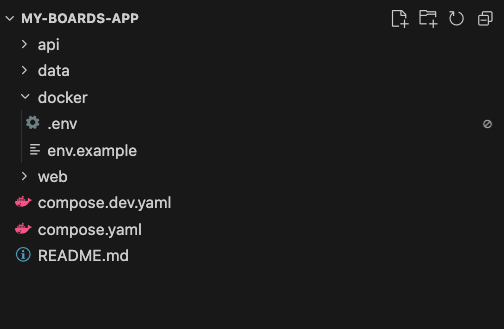
Project Structure 0:00

project structure

  • The Baseboards project includes files necessary for running the application.
  • The project consists of:
    • Docker Compose configuration files.
    • API: The backend built with FastAPI, utilizing SQLAlchemy for database models.
    • Data Storage: By default, data is stored locally, but pluggable storage options for cloud services are available (pending implementation).
    • Web: The frontend is built with Next.js, featuring a simple set of dependencies including Tailwind CSS and Bratics controls.

Backend Overview 1:08

backend overview

  • The backend is primarily written in Python and is structured as a FastAPI application.
  • It includes:
    • Database models using SQLAlchemy.
    • A GraphQL API implemented with Strawberry, allowing for queries and mutations.
    • Workers running in a separate container for independent scaling from the API server.

Generators 2:29

generators code

  • Generators are responsible for calling the models and generating content.
  • Examples include implementations for audio, video and image processing, such as Nano Banana Pro and Flux 2.
  • Users can modify these generators as needed or create their own.

Authentication and Storage 3:13

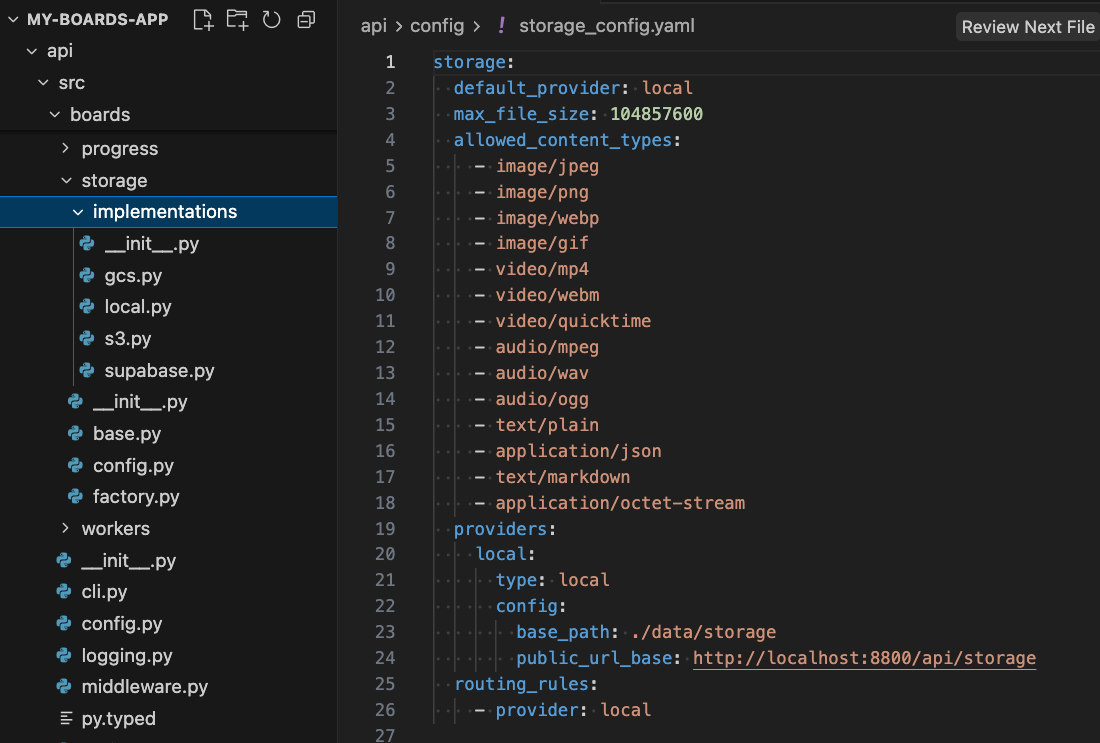
storage config

  • Current authentication support is limited, but future plans include integration with various auth providers.
  • The storage implementation is currently local, with aspirations to support popular cloud storage options like Google Cloud and S3.

Frontend Overview 4:27

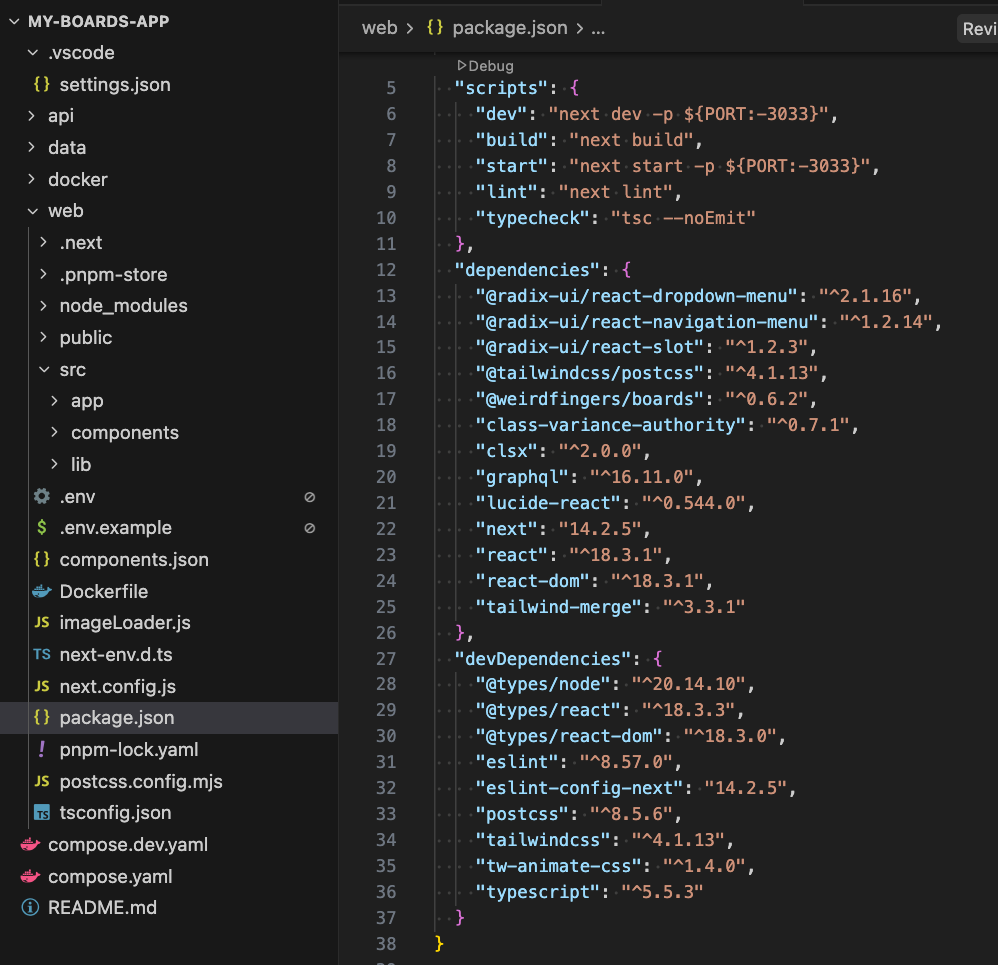
frontend overview

  • The frontend is a basic Next.js application.
  • Dependencies include the npm package @weirdfingers/boards for core functionality.
  • Future support for other frameworks like Svelte and Create React App (CRA) is desired.

Customization and Features 9:04

generated-image-at-00:09:04

  • Users have full access to the source code for both the backend and frontend, allowing for extensive customization.
  • The video contains a vibe coding session for two such customizations:
    • Simple generic customizations such as adding a dark mode feature.
    • Making use of Boards-specific functionality, such as renaming boards, although this may soon become obviated, as there is an existing Github issue for such functionality, marked good first issue and help wanted

Watch the full video walkthrough

What's New in Baseboards: A Developer's Guide (With Minimal Sarcasm)

· 5 min read
Charles P
Boards Creator & Maintainer

Based on the Loom walkthrough

1. Creating a New Baseboards Project

0:00

The walkthrough begins the way all good projects do: with a single command line incantation:

npx @weirdfingers/baseboards up my-boards-app

This command scaffolds a brand-new Baseboards project—frontend, backend, worker, and infrastructure templates included. If you’ve ever wished your “new project” button also came with working Docker orchestration and a GraphQL API, this is it.


2. API Keys & Docker: The “Why Is My Laptop Spinning Up Containers?” Section

0:11

You’ll enter a few model provider API keys, and then—almost before you can ask “is this strictly necessary?”—Docker Compose launches.

A reasonable question at this point:

Why Docker for a local app? Isn’t Docker for, like, distributed systems and people who enjoy YAML?

In Baseboards’ case, Docker gives us:

  • isolated containers for Postgres, Redis, worker, and API services
  • identical environments across local dev, staging, and production
  • a deployment model that moves cleanly from “my laptop” → “my startup” → “my questionable future Kubernetes cluster”

Yes, it’s a lot of machinery for a local app.
But it’s the same machinery you’ll want later when Baseboards is hosting thousands of artifacts instead of three test PNGs.


3. Scalability Isn’t Just Marketing

0:34

One of Baseboards’ goals is to scale to any deployment shape:

  • Kubernetes: for the “I run a cluster and am emotionally prepared for this” crowd
  • Single backend: the “just give me one machine that works” use case
  • Local development: everything running neatly in containers, immune to dependency drift

The same architecture works across all three. That’s why we start on Docker—it’s the lowest common denominator that still behaves like a real distributed system.


4. Creating a New Board & Meeting Nano Banana Pro

1:09

Once the environment is up, you can head to localhost:3300 and create a new board.
Boards are the top-level containers for your artifacts—images, videos, text, audio, diagrams, all of it.

This release introduces support for:

Nano Banana Pro

A shockingly good model for infographics, diagrams, and other structured image output.


5. Testing Nano Banana Pro With an Architectural Diagram

1:16

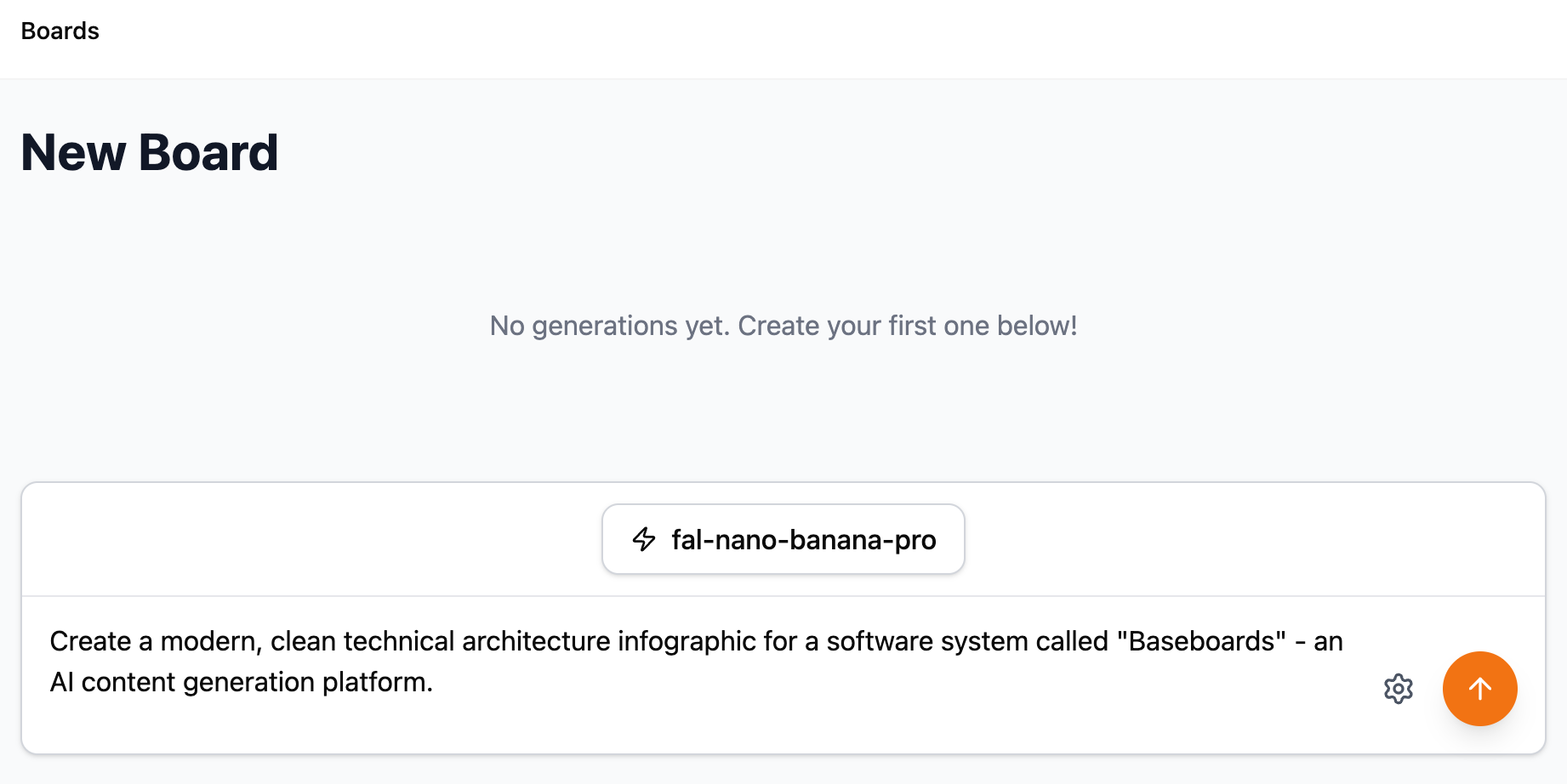
Nano Banana Infographic Prompt

To test the model, we ask it to generate an architectural diagram of Baseboards itself.

The prompt was generated using Claude, which was asked to:

  1. Look at the Baseboards project code
  2. Summarize the system architecture
  3. Produce a prompt describing that architecture visually

It’s AI analyzing code to produce a prompt for another AI to generate an image of the code used by the first AI.
This is what software development looks like now. We’re all just living in it.


6. Monitoring the Worker and Logs

2:07

When the model is generating, you can:

  • click into the job
  • or—if you enjoy the feeling that you are in a late-90s hacker movie—
    check the logs in the terminal.

(inside the project directory)

npx @weirdfingers/baseboards logs -f

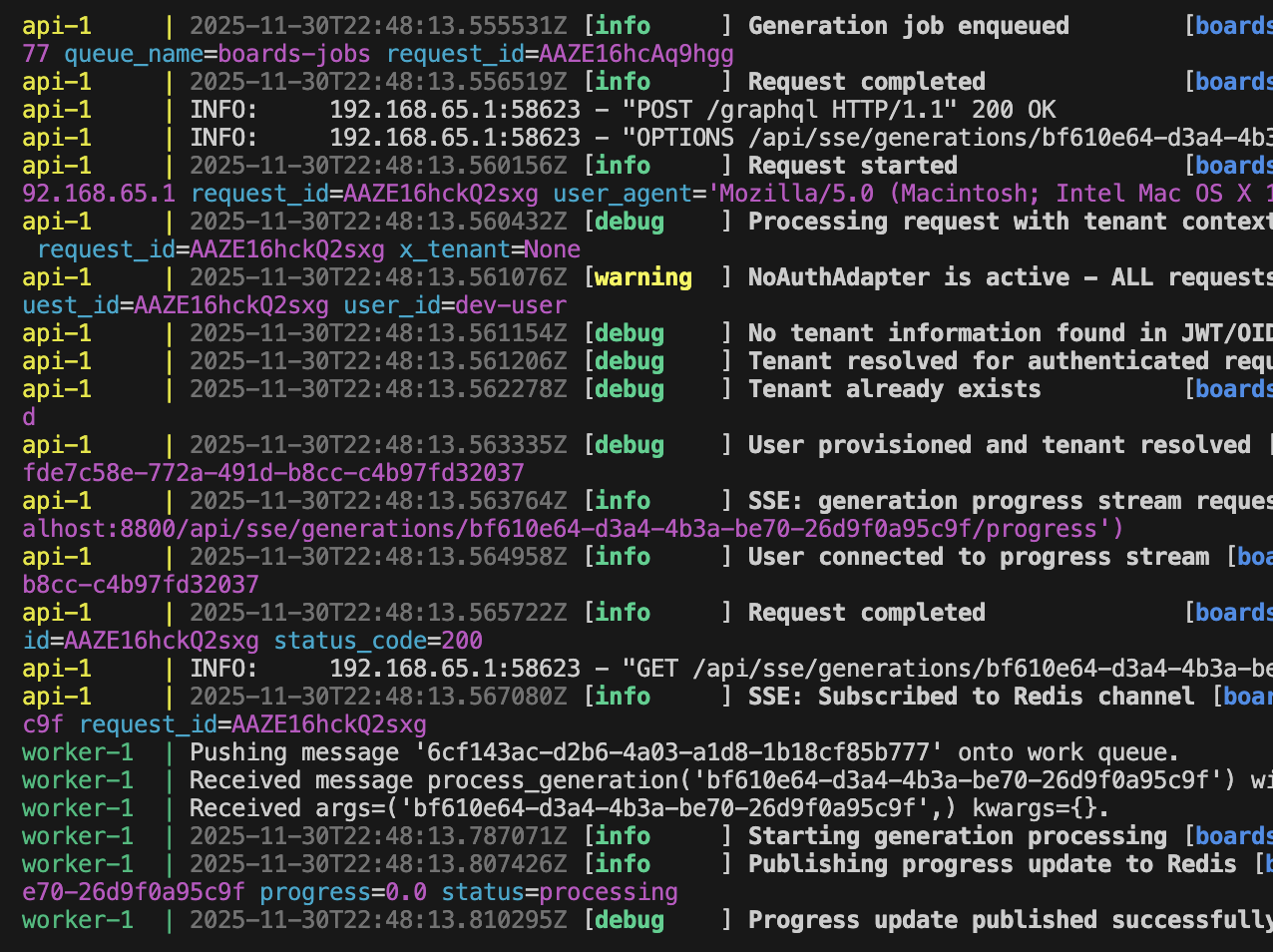
You’ll see the worker pick up the job, send it to Nano Banana Pro, receive the output, and push it back through the API.

Logging Output

Baseboards’ logs are human-readable, which is a refreshing change from certain systems we won’t name.


7. Infographic Success (Mostly)

2:37

When the worker finishes, the artifact appears directly on your board.

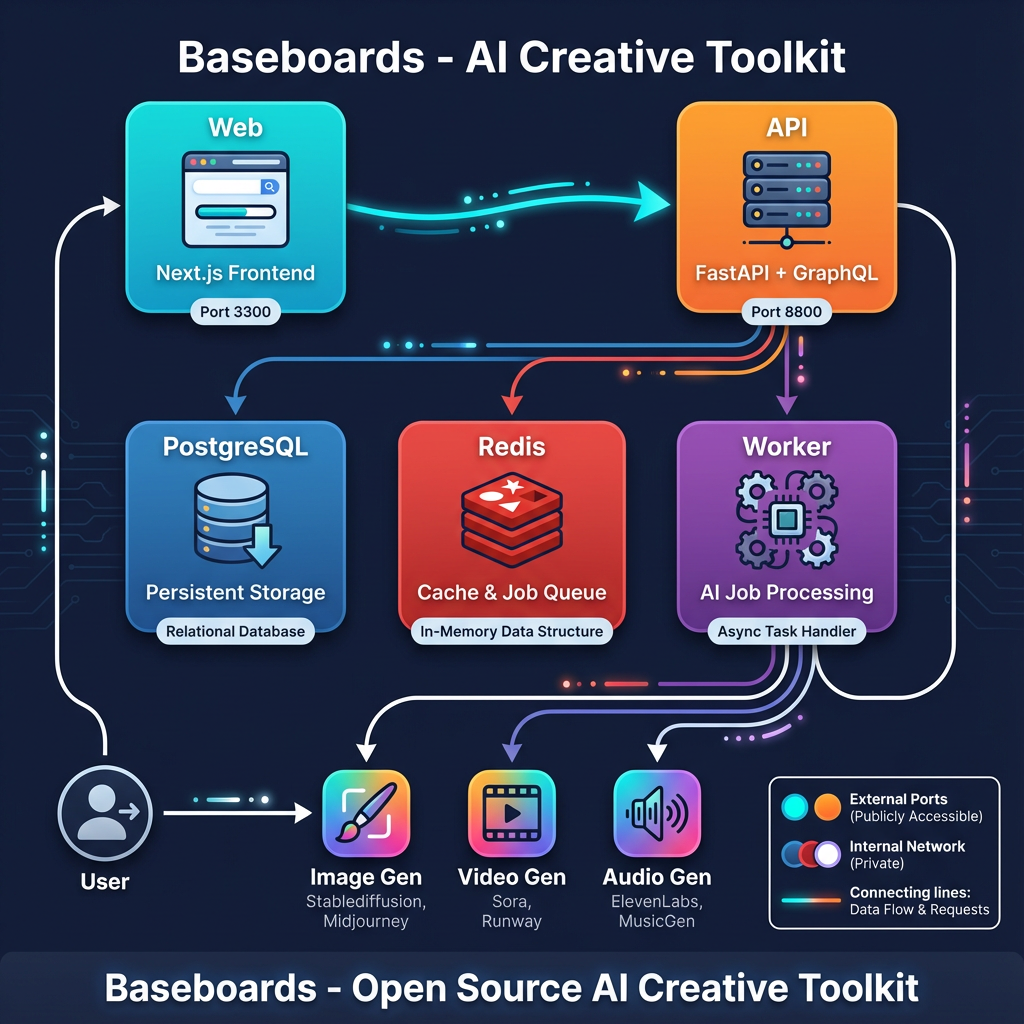
Architecture Diagram

The generated infographic:

  • is visually clean
  • maps the major components correctly
  • contains several arrows
  • and—most impressively—gets most of them pointing in the right direction

There are a few small hallucinations (e.g. Midjourney support, which Baseboards emphatically does not have), but diagram-hallucination is a known side effect of models trying to be helpful.


8. Architecture Overview (AI-Generated, Human-Corrected)

3:07

The real Baseboards architecture looks like this:

  • Frontend (Next.js)
  • FastAPI + GraphQL backend
  • Postgres
  • Redis
  • Worker process
  • Model provider

The AI-generated diagram was close but forgot the part where the worker writes results back to the database, which is arguably the most important arrow.
We’ll blame the prompt, not the model.


9. Next Steps: Exploring the Project Structure

4:03

The next episode will dig into:

  • what’s inside the generated Baseboards project
  • how the API, worker, and frontend are wired together
  • where to customize jobs and add new model providers
  • how the Docker services communicate
  • and how to extend Baseboards to support new artifact types

Think of this episode as the appetizer.
Next time we go into the folder structure—the part everyone skips until something catches fire.


Full Video Walkthrough

https://loom.com/share/f496dcd5f36c49cb9d308667bff813dd